

Marquee
The Marquee is a horizontal strip of text that scrolls continuously — use it for announcement bars, logo/keyword tickers, “as seen in” strips, or any looping banner. The scroll is seamless: the list loops with no visible jump. It adapts to your site’s theme colors and pauses while selected so you can edit the text while it holds still.
Add a marquee
Section titled “Add a marquee”Open the Components tab (puzzle-piece icon) or the Blocks search.
- Find Marquee under the Interactive category.
- Drag it onto the canvas and drop it where you want it.
Configure it
Section titled “Configure it”Select the marquee and open the Settings tab. All options live there:
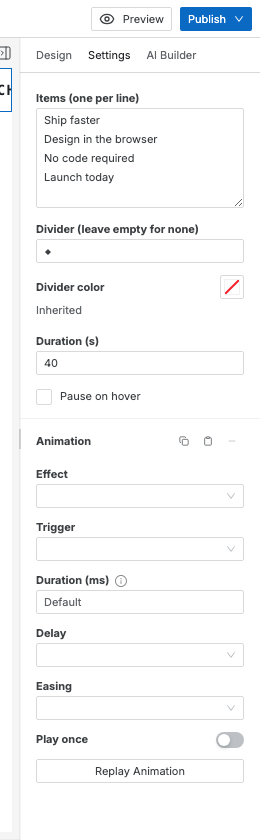
| Setting | What it does |
|---|---|
| Items | The scrolling phrases, one per line. Blank lines are ignored. |
| Divider | The glyph shown between items (e.g. ◆ • ★ ⚡). Leave empty for no divider. |
| Divider color | The color of the divider glyph. Picks from your theme palette or a custom color; clear to inherit. |
| Duration (s) | How many seconds one full loop takes. Higher = slower. Default is 40. |
| Pause on hover | When on, the scroll stops while the visitor’s pointer is over the marquee. |
Styling the text
Section titled “Styling the text”The font, size, weight, letter-spacing, and text color all live on the marquee itself — select it and use the Design panel like any other element. The ships-with defaults are a bold, uppercase, wide-tracked mono look; restyle to taste and every item follows. There are no separate item elements to select, which is deliberate: you edit the text in the Items trait, and style it on the wrapper.
How it works
Section titled “How it works”A seamless CSS marquee needs two identical tracks side by side: as the first slides fully out of view, the second is already sliding into its place, and the loop restarts with no jump. Swebsy generates both tracks for you from a single source of truth — the items, divider, and speed you set. You never edit the moving text twice or manage a hidden mirror copy.
Because the settings are the source of truth, the same marquee is edited the same way everywhere: by you in the Settings panel, by the AI Builder from a prompt, and it exports to clean static HTML that scrolls without any JavaScript.
Accessibility
Section titled “Accessibility”The duplicate track that makes the loop seamless is hidden from screen readers (aria-hidden), so assistive tech reads each phrase once, not twice. Keep marquee text short and non-essential — for critical information, use a normal heading or progress bar that isn’t moving. Turning on Pause on hover also helps visitors who need the text to hold still to read it.
The text scrolls too fast / too slow — adjust Duration (s). It’s the time for one full loop, so a bigger number scrolls slower.
My phrases run together — add a Divider glyph, or put fewer, shorter items on each line.
The divider is invisible — set a Divider color, or pick a theme color with more contrast against your section background.
A style change didn’t take — style the marquee itself (the selected element), not the words. Font, size, and color set on the wrapper flow to every item.