

Version history
Every cloud-synced site keeps restore points. Some are taken for you as you work; others you create and name yourself before doing something you might want to undo.
Open them from the cloud status icon in the Studio topbar → Version history….
Automatic snapshots
Section titled “Automatic snapshots”Swebsy snapshots a cloud-synced project as it syncs, at most once every 15 minutes. The first cloud save always gets a restore point. After that, the cadence keeps recent history without turning every keystroke into stored data you pay for.
Automatic snapshots are listed by date and time, described as
Auto-save #<revision>. The 10 most recent are kept; older ones are
discarded.
Named checkpoints
Section titled “Named checkpoints”A checkpoint is a restore point you create on purpose — “before the hero redesign”, “client-approved v1” — and it is not evicted by the automatic ones.
- Open Version history… from the cloud status icon.
Type a name in the Name this checkpoint field (up to 100 characters).
- Click New checkpoint.
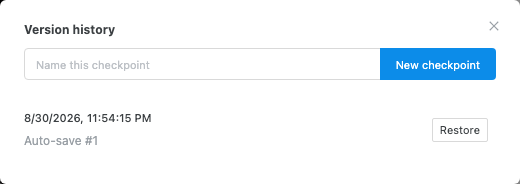
Checkpoints ignore the 15-minute cadence — you can take one whenever you want. The 10 most recent checkpoints are kept, counted separately from the automatic ones, so a busy afternoon of autosaves can never push out a checkpoint you named.
Restoring
Section titled “Restoring”- Open Version history….
- Find the entry you want and click Restore.
- Confirm.
Images and files are pinned to the snapshot that uses them. An image you deleted from the project weeks ago is still there when you restore a version that used it — the restored page renders as it did, rather than coming back with broken images.
Version history vs. backups
Section titled “Version history vs. backups”They solve different problems and it is worth having both:
| Version history | Project backup | |
|---|---|---|
| Needs a paid plan | Yes | No |
| Where it lives | Swebsy’s servers | A file you keep |
| Created | Automatically, plus your checkpoints | When you export one |
| Good for | Undoing recent work | Archiving, moving between accounts, keeping a copy Swebsy doesn’t hold |
If a site matters, take a backup file at milestones too. Version history is bounded — 10 automatic and 10 named entries — so it is not a long-term archive.
“No restore points yet” — the first cloud save normally creates one. Try Sync now, then reopen the list; if it is still empty, check the sync error shown by the cloud icon.
No “Version history…” in the menu — the site is not cloud-linked. Click Save to Cloud first.
Restore fails with an upgrade prompt — you can view history on a lapsed plan, but restoring needs an active subscription. See Plans & billing.
A checkpoint I made is gone — more than 10 checkpoints exist and it was the oldest. For anything you need to keep indefinitely, export a backup file.