

Plans & billing
What’s free
Section titled “What’s free”Building is free, permanently and without an account. The free tier gives you the whole editor: every block, component, theme token, animation, symbol, and the AI builder with your own model. You can export a static ZIP or deploy to GitHub Pages as often as you like. Support on the free tier is community support; paid plans add email support.
The free tier is local. Your project lives in your browser and is not sent to a Swebsy server unless you deliberately turn on a hosted feature. Deploying or using an external integration sends the data that operation needs to its provider.
What’s paid
Section titled “What’s paid”Paid plans add Swebsy’s hosted side — the parts that cost us storage and bandwidth to run:
- Cloud sync — your project stored server-side and kept in step across devices
- Version history — automatic snapshots plus named checkpoints you can restore
- Swebsy Hosting — one click to
yourname.swebsy.sitewith SSL, previous-version rollback, and no third-party tokens - Custom domains — your own hostname with a managed certificate
| Starter | Pro | |
|---|---|---|
| Monthly | $9 / month | $19 / month |
| Annual | $69 / year | $149 / year |
| Published sites | 3 | 10 |
| Storage | 10 GB | 100 GB |
| Cloud projects | Unlimited | Unlimited |
| Custom domain + SSL | Yes | Yes |
| Support | Priority |
Annual billing is charged once a year and works out around 35% cheaper than paying monthly — $5.75 and $12.42 a month respectively.
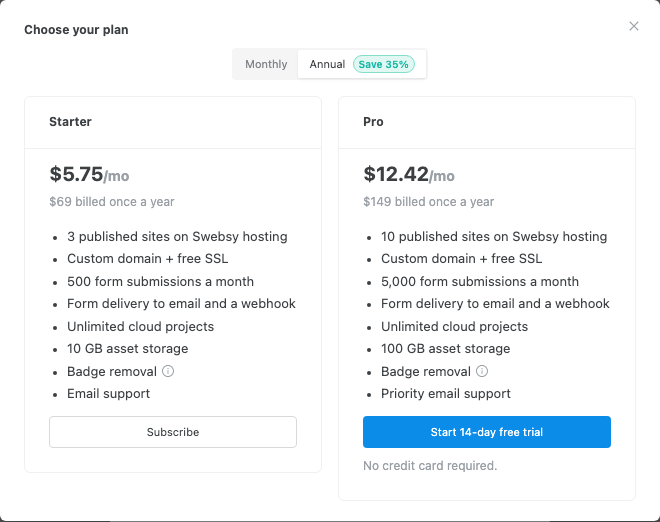
“Cloud projects” are unlimited, but the project data they store counts toward your storage limit like everything else.
The Pro trial
Section titled “The Pro trial”Pro offers a 14-day trial that does not ask for a card. It runs on the Pro plan with reduced caps, so it is enough to evaluate the workflow end to end but not to run a business on:
- 1 published site (not 10)
- 2 GB storage (not 100 GB)
- 50 form submissions (not 5,000)
The Swebsy badge stays on trial sites; badge removal comes with a paid plan.
Your email address must be verified before a trial or a subscription can start. When the trial ends without a payment method, the subscription simply cancels — you are never charged by surprise. Cloud access ends that day: a trial that never converted gets no grace period, so subscribe before it runs out if you have a site published. Everything local keeps working, and export is always available.
Start your free trial → Studio walks you through creating an account and verifying your email, then starts the trial.
Subscribing
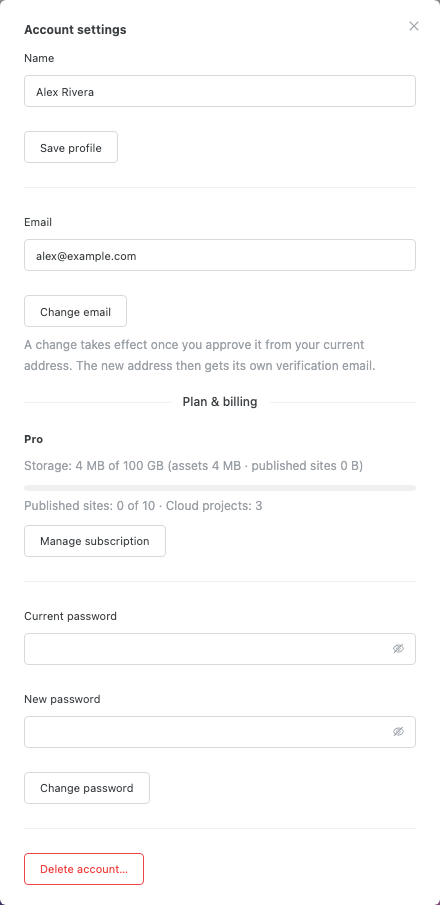
Section titled “Subscribing”- Click your avatar → Account settings.
- Click Upgrade….
Choose Monthly or Annual, then click the plan you want. Annual billing is charged once a year at the lower effective monthly rate.
Complete payment on Stripe’s checkout page. You return to Swebsy afterwards.
Payment, invoices, and card details are handled entirely by Stripe. Swebsy never sees your card number.
Managing or cancelling
Section titled “Managing or cancelling”Account settings → Manage subscription opens the Stripe customer portal, where you can switch plans, change your payment method, download invoices, and cancel. Changes take effect in Swebsy as soon as the portal reports them — there is nothing to refresh on our side.
Storage: what counts
Section titled “Storage: what counts”Your storage number is measured live from what you actually have stored, not from a running tally, so it is always current. Three things add to it:
| Counts toward storage | Notes |
|---|---|
| Uploaded assets | Images, video, fonts, and other files in cloud-synced projects |
| Published site files | The files served for each live site, plus retained previous versions for rollback |
| Project data | Each cloud project, plus its retained snapshots |
Project data is compressed before storage, so it is usually a small share of the total. Assets are normally the bulk of it.
Individual limits apply on top of the plan total: an uploaded asset may be up to 25 MB, a single published file up to 10 MB, and a published site up to 500 files.
Warnings and the hard stop
Section titled “Warnings and the hard stop”At 80% you get an email and a banner on the home page. At 100% the banner turns red and new uploads and publishes are refused with a “storage limit” error — existing sites stay online and keep serving.
To free space, remove unused images and files from your projects or upgrade the plan. Two things delay the number going down: an asset held by a snapshot stays until that snapshot ages out of version history, and after its final reference disappears it remains protected for 24 hours before the next daily cleanup can remove it.
Unpublishing takes a site offline but deliberately retains its deployments for rollback and later republishing, so it does not free deployment storage.
Deleting a site from My Sites does not reduce cloud storage: it removes the local copy only, and the cloud copy is retained. See Cloud sync.
When a payment fails
Section titled “When a payment fails”Nothing happens immediately. Stripe retries a failed payment for up to about two weeks, and you keep every cloud feature during that window. You will get email from Stripe about the failure — update the card through Manage subscription and the retry succeeds.
When a subscription ends
Section titled “When a subscription ends”Cancelling a paid subscription starts a 30-day grace period. (A trial that lapsed without converting does not — see The Pro trial.)
The grace period is granted once every 12 months, and only to a subscription that was actually paid for. If you cancel again within a year of a previous cancellation, cloud access ends the day the subscription does.

On the day the grace period ends:
- Published sites go offline. Visitors get an offline page. Your custom domain stops serving.
- Cloud sync becomes read-only. You can still sign in, list your cloud projects, and download them. You cannot push changes, save checkpoints, or restore an old version.
- Local sites are untouched. Everything in your browser keeps working on the free tier, including export and third-party deploys.
- Nothing is automatically deleted today. Your project data, assets, and past deployments remain available to read or download after grace.
Because deployments are retained rather than discarded, resubscribing lets you put a site back online from a version you already uploaded — no re-upload or rebuild. Retention is not a substitute for your own long-term backup; export important projects before grace ends.
“This feature requires a Swebsy plan” — you are signed in on the free tier. Start a free trial, or subscribe from Account settings.
“Your subscription has ended. Resubscribe to keep using cloud features.” — the 30-day grace window has closed, or you had already used one in the past 12 months. Resubscribing restores access to the data, which is still there.
“Resubscribe to add a new custom domain” — new hostnames need an active plan. Domains already attached keep serving until grace ends.
Trial won’t start — trials require a verified email address, and are once per account. Check for the verification email first.
Storage looks higher than the files I can see — retained previous deployments and retained snapshots both count. Publishing a smaller site does not immediately shrink the number, because the earlier versions are kept for rollback.
Subscribed but Swebsy still shows the free plan — reopen Account settings to refetch. If it persists after a page reload, the Stripe webhook may not have arrived; contact support with your Stripe receipt.