

Swebsy vs Webstudio: pricing, export and self-hosting compared
Webstudio and Swebsy are closer than most pairs here. Both are visual builders, both let you export, and both work with AI agents. The differences are in the details.
Pick Webstudio if you need dynamic pages from a headless CMS, want to run lots of hosted sites on one flat plan, or want to export a server app you run yourself.
Pick Swebsy if your site is static, you want to edit without an account, and you’d rather host it free on GitHub or Cloudflare Pages.
We make Swebsy, so weigh that. Every Webstudio fact below links to Webstudio’s own pricing page or docs. Prices are in USD, checked on 25 September 2026.
At a glance
Section titled “At a glance”| Webstudio | Swebsy | |
|---|---|---|
| Best for | Designers who want full CSS control and CMS-backed pages | Small static sites you edit and host yourself |
| Account needed | Yes | No, to build and export |
| Free plan | Unlimited projects and pages on a wstd.io subdomain, 300 form submissions a month | Whole editor, unlimited local projects |
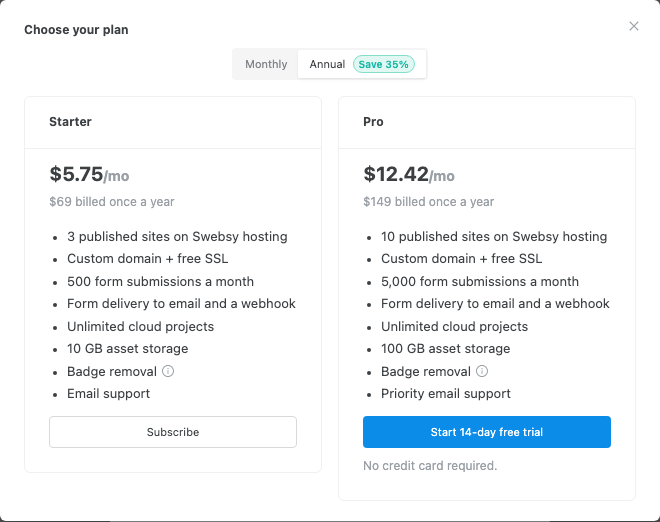
| Custom domain | From $15/month (Pro), unlimited sites | Free on GitHub or Cloudflare Pages. From $69/year on our host |
| Static export | Yes, from the builder | Yes, on every plan |
| Dynamic export | Yes, as a server app you deploy | No. Static output only |
| CMS | Connects to outside CMSs like WordPress, Strapi or Airtable | No |
| AI agents | MCP, listed on Pro | MCP bridge on every plan, plus an AI builder with your own key |
| Team editing | Team plan, 5 seats included | Not yet. One editor per project |
Pricing, side by side
Section titled “Pricing, side by side”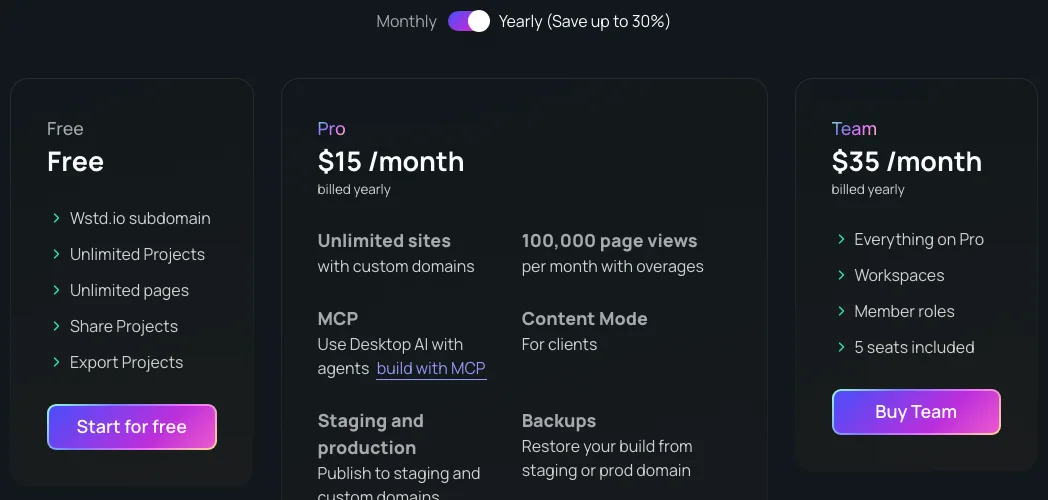
Webstudio’s Pro plan includes 100,000 page views a month. Past that it’s $20 per extra 100,000.
What a year costs for a few common jobs, billed yearly:
| The job | Webstudio | Swebsy |
|---|---|---|
| One site on your own domain, hosted | $180 (Pro) | $69 (Starter), or $0 self-hosted |
| Static files to host yourself | $0 | $0 |
| 20 hosted sites on custom domains | $180 (Pro, within page-view limits) | Over Pro’s 10-site limit |
| Blog pages pulled from a headless CMS | $180 (Pro) | Not a fit. There’s no CMS |
| Five people on one workspace | $420 (Team) | Not a fit yet |
For a single hosted site, Swebsy is cheaper. For many sites or a team, Webstudio’s flat plans win.
The editors
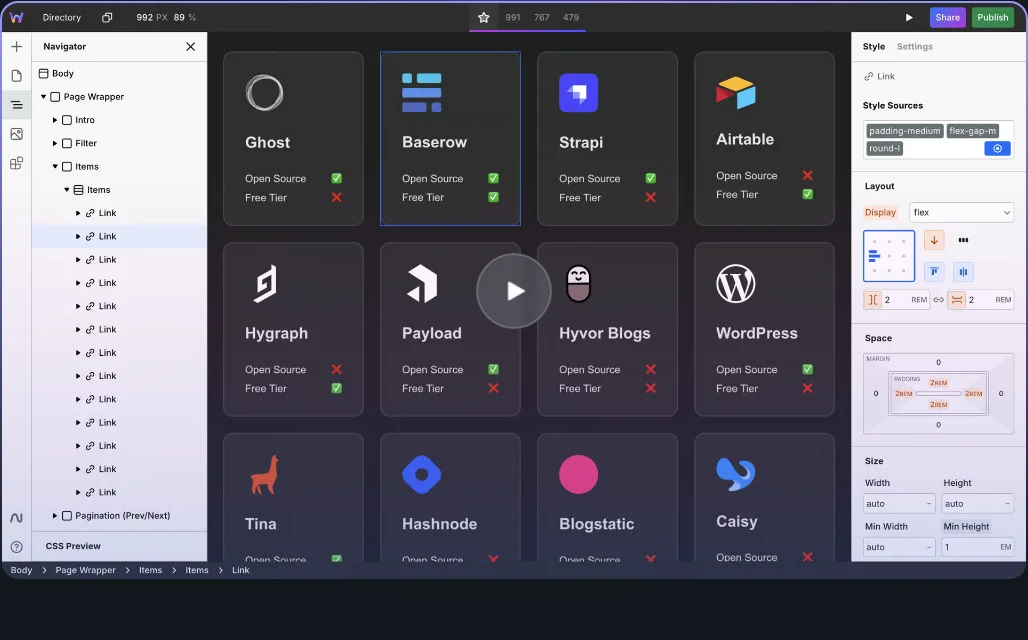
Section titled “The editors”Webstudio’s builder exposes nearly every CSS property, with a navigator, style sources and a full style panel. It’s built for people who know or want to learn CSS.
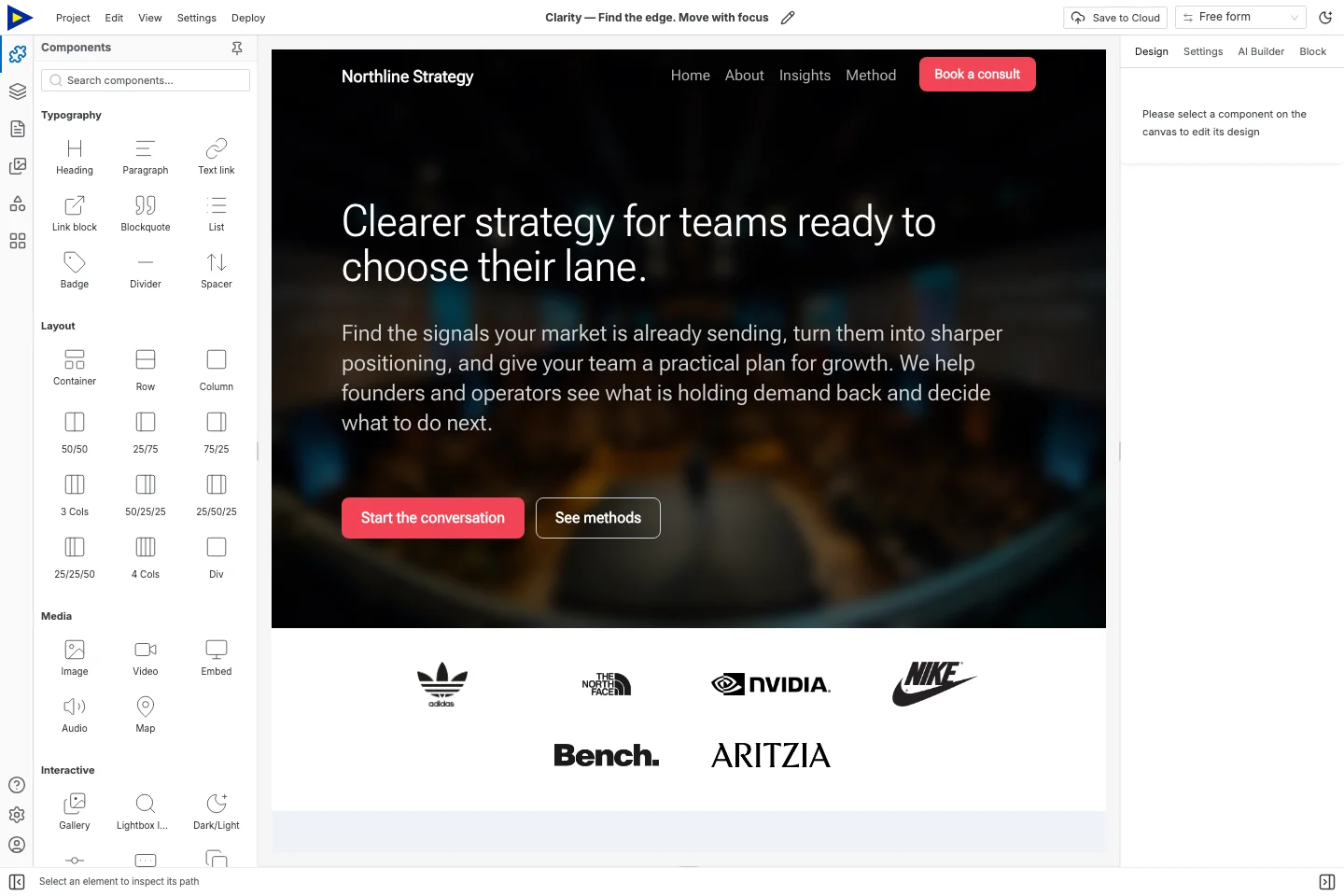
Swebsy’s Studio covers the same ground with theme tokens, a design panel and ready-made blocks, so you can get far without writing CSS. And it runs entirely in your browser, with no account.
“Self-hosting” means three things
Section titled ““Self-hosting” means three things”Pin down which one you need before you choose.
A static site is HTML, CSS and assets. Both tools export one. Swebsy’s comes from Deploy → Export code. Webstudio’s comes from the builder’s download button. Webstudio’s docs say its static export leaves out dynamic pages, redirects, forms and image optimization.
A dynamic site runs code on a server. Webstudio can export one as an app that handles CMS pages, webhook forms, image optimization and redirects. You deploy it to something like Vercel, Netlify or a Docker server. Swebsy doesn’t do this.
The builder itself. Webstudio’s docs say self-hosting its builder in production is “more difficult and currently not recommended”. Swebsy’s builder already runs in your browser and keeps your project there, so there’s nothing to host.
Forms are the thing to test
Section titled “Forms are the thing to test”On a static export, neither tool processes forms for you.
In Swebsy, Collect with Swebsy works on Swebsy Hosting. Anywhere else, use Post to my own URL with a form service you trust. Webstudio’s cloud plans include form submissions, and its dynamic export supports webhook forms.
Whichever you choose, send a real test from the live site and check it arrives.
Where Webstudio is the better choice
Section titled “Where Webstudio is the better choice”- You need pages built from a headless CMS.
- You run many sites and want one flat hosting price.
- You want full CSS control, or you’re coming from Webflow.
- You want to deploy a server-side version of the site yourself.
Where Swebsy is the better choice
Section titled “Where Swebsy is the better choice”- Your site is static and you’d rather not make an account to build it.
- You want to host for free on GitHub or Cloudflare Pages.
- You’d rather use theme tokens and blocks than write CSS.
- You want an AI agent to edit your site on the free plan.
Moving between them
Section titled “Moving between them”Neither has an importer for the other. Rebuild the pages, move your assets and page details, and reconnect forms and the domain.
For a static site, try the multi-page export guide with your real content. For anything dynamic, list the runtime and services it needs before you pick a builder.