

AI builder setup
The AI builder lets you describe what you want and Swebsy generates or edits page sections for you. It talks to a model you supply, so you choose the provider and pay them directly — Swebsy adds nothing on top.
The AI provider dropdown ships with these presets:
| Provider | Notes |
|---|---|
| Claude (Anthropic) | The default, and what the builder is tuned against |
| OpenAI | GPT models |
| OpenRouter | One key, many models from different vendors |
| Groq, Together AI, Fireworks AI, DeepInfra | Fast hosted inference for open models |
| DeepSeek, Mistral AI | Those vendors’ own APIs |
| Ollama (local), LM Studio (local) | Runs on your machine — no key, nothing leaves your computer |
| Custom URL… | Any server that speaks the OpenAI /v1/chat/completions API |
Each preset comes with its own model list; Custom model… lets you type any model ID the provider accepts.
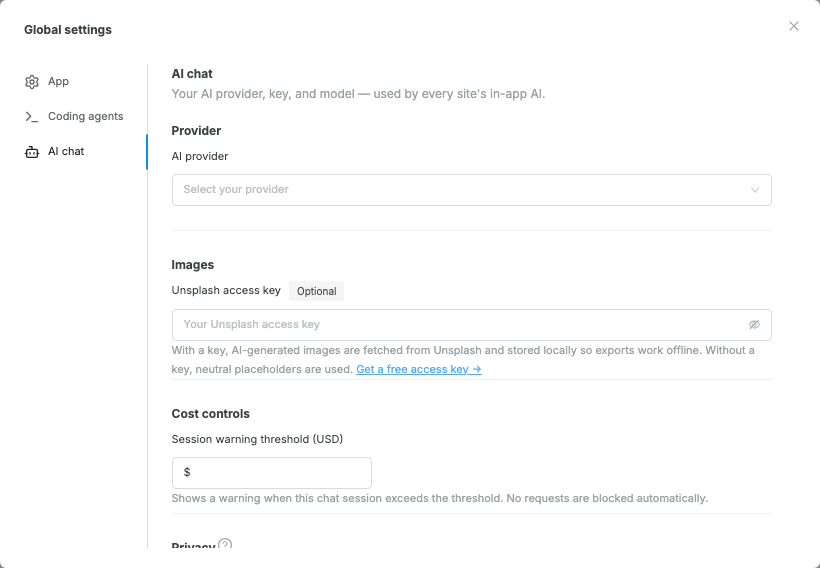
Every provider is configured in the same place — the Global settings gear → AI chat tab. The setting is per-user, not per-site, so a key you add once applies to every site you build on this machine.
Option A — Anthropic Claude
Section titled “Option A — Anthropic Claude”Open the Global settings gear (top-right on Home, or in the Studio topbar), then the AI chat tab.
- Set AI provider to Anthropic (Claude).
- Paste your Anthropic API key into the API key field.
- Select the Claude model you want to use (default: Claude Sonnet).
Optionally set a Session warning threshold (USD) to be warned when the session cost exceeds it.
Available Claude models
Section titled “Available Claude models”| Model | Speed | Quality | Recommended for |
|---|---|---|---|
| Claude Haiku 4.5 | Fastest | Good | Quick edits and small changes |
| Claude Sonnet 4.6 | Balanced | High | General use (default) |
| Claude Opus 4.7 | Slowest | Highest | Full page generation |
You can also type any Anthropic model ID directly by selecting Custom model ID… from the model dropdown.
Option B — OpenAI-compatible / Local
Section titled “Option B — OpenAI-compatible / Local”This option works with any server that implements the OpenAI /v1/chat/completions API — including local apps running on your machine.
Popular local servers
Section titled “Popular local servers”| Server | Default base URL | Notes |
|---|---|---|
| Ollama | http://localhost:11434 |
Run ollama serve then ollama pull llama3 |
| LM Studio | http://localhost:1234 |
Enable the local server from the app |
- Start your local AI server (e.g. run
ollama serve). - Open the Global settings gear, then the AI chat tab.
Set AI provider to OpenAI-compatible / Local (Ollama, LM Studio…).
Enter the Base URL of your server (e.g.
http://localhost:11434).Enter the model name exactly as the server expects it (e.g.
llama3.2).If your server requires authentication, paste an API key into the API key field. Local servers (Ollama, LM Studio) do not require one — leave it blank.
- Click Test connection to verify the server is reachable.
Add an Unsplash key (optional)
Section titled “Add an Unsplash key (optional)”When an Unsplash access key is configured, the AI replaces placeholder image URLs with real photos fetched by keyword from Unsplash.
- Create a free app at unsplash.com/developers.
- Copy the Access Key.
- Paste it into the Unsplash access key field in Global settings → AI chat.
Use the AI builder
Section titled “Use the AI builder”After saving your settings, open the AI panel from the editor and describe the change you want. The AI builder can help with common authoring tasks:
| Task | What to ask for |
|---|---|
| Create a page | “Create a landing page for a photography studio.” |
| Add a section | “Add a pricing section below the hero.” |
| Edit selected content | “Make this section clearer and more direct.” |
| Update site settings | “Set the site title to Acme Studio and improve the meta text.” |
| Match an existing style | “Add a testimonials section that matches this page.” |
For best results, select the page section you want to change before asking for an edit. Use short, specific prompts and review the generated content before publishing.
Budget expectations
Section titled “Budget expectations”Anthropic: Usage is billed by Anthropic against your account. Set a Session warning threshold in Global settings → AI chat to get a warning before costs add up.
Local / OpenAI-compatible: Running models locally is free of Anthropic charges. Cloud providers on the OpenAI-compatible path (Groq, Together, etc.) bill through their own accounts — check their pricing directly.
Privacy
Section titled “Privacy”- Your API key is stored only in your browser — it never leaves your device, and it is not included in project backups or exports.
- Local servers (Ollama, LM Studio) never send your data to a third-party — everything stays on your machine.
- Enable Sanitize content before sending to have Swebsy redact emails and phone numbers before sending prompts to any AI provider.
“Invalid API key” error (Anthropic) — check that you copied the full key from the Anthropic Console without any extra spaces.
“Cannot reach server” error (local) — make sure the server is running before testing. For Ollama: ollama serve. For LM Studio: enable the local server from the app’s settings.
AI panel doesn’t appear — ensure your settings were saved, then refresh the page.
Responses are slow — for Anthropic, try switching from Opus to Sonnet or Haiku. For local servers, a smaller or quantized model will be faster.
Model not found (local) — the model name in Swebsy must match exactly what the server expects. For Ollama, run ollama list to see available model names.