

Swebsy vs Framer: pricing, AI and hosting compared
Pick Framer if you design visually first and want hosting, a CMS, staging and team editing handled for you. It’s polished, fast to publish, and its design tools are some of the best around.
Pick Swebsy if you want the site as plain files you can host anywhere. Framer doesn’t export HTML at all. Swebsy exports on every plan, free.
We make Swebsy, so weigh that. Every Framer fact below links to Framer’s own pricing page or help center. Prices are in USD, checked on 25 September 2026.
At a glance
Section titled “At a glance”| Framer | Swebsy | |
|---|---|---|
| Best for | Design-led marketing sites on managed hosting | Static sites you want to own and host anywhere |
| Free plan | Framer subdomain, 1 GB bandwidth, 500 AI credits | Whole editor, unlimited local projects, no account |
| Custom domain | From $10/month (Basic) | Free on GitHub or Cloudflare Pages. From $69/year on our host |
| Page limit | 30 on Basic, 150 on Pro | None |
| CMS | 2 collections on Basic, 10 on Pro | No |
| Export to HTML | No | Free, on every plan |
| Host it yourself | No | Yes, on any static host |
| AI | Built-in agent on credits, plus external agents | AI builder with your own model key, plus an MCP bridge |
| Team editing | Extra editors $20/month each | Not yet. One editor per project |
Pricing, side by side
Section titled “Pricing, side by side”| Plan, billed yearly | Framer | Swebsy |
|---|---|---|
| Free | $0. Framer subdomain, 1 GB bandwidth | $0. Whole editor and export. Your domain on GitHub or Cloudflare Pages |
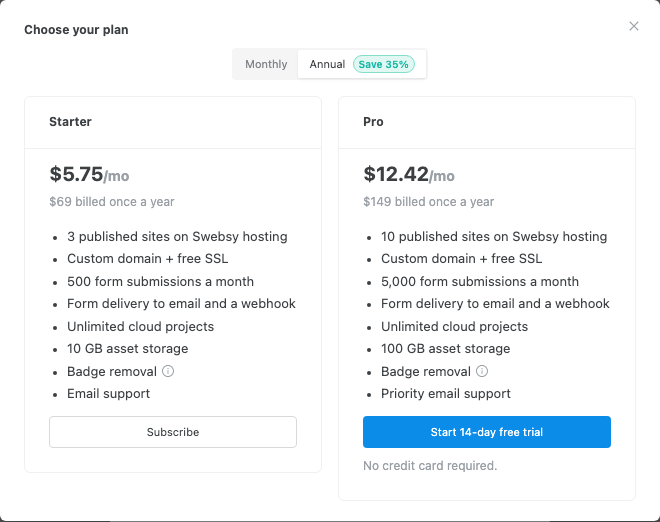
| Entry | Basic, $10/month. Custom domain, 30 pages, 2 CMS collections, 50 GB bandwidth | Starter, $69/year ($5.75/month). 3 hosted sites, custom domain, 500 form submissions a month |
| Next | Pro, $30/month. 150 pages, 10 CMS collections, 100 GB, staging, redirects | Pro, $149/year ($12.42/month). 10 hosted sites, 5,000 form submissions a month |
| Extra people | $20/month per editor. Viewers are free | No team seats yet |
Framer’s page limits, CMS items and bandwidth can grow with paid add-ons on Pro. Check Framer’s pricing page for the current caps.
What a year costs for a few common jobs:
| The job | Framer | Swebsy |
|---|---|---|
| One landing page on your own domain, hosted | $120 (Basic) | $69 (Starter), or $0 self-hosted |
| A site with a CMS-driven blog | $120 (Basic) | Not a fit. There’s no CMS |
| Three people editing one site | $600 (Basic + 2 editors) | Not a fit yet |
| The site’s code, to host on your own server | Not available | $0 |
The editors
Section titled “The editors”Framer feels like a design tool that publishes. Its canvas, components and animations are its strength, and its built-in agent can lay out whole pages from a prompt.

Swebsy’s Studio is a visual editor for static sites: layers, a design panel, theme tokens, responsive views and symbols. You can edit by hand, use the AI builder, or let a coding agent drive it.
Hosting: theirs, or anywhere
Section titled “Hosting: theirs, or anywhere”This is the real difference.
Framer’s help center says it plainly: “Framer does not offer HTML export for self-hosting.” Its performance features depend on Framer’s own hosting. Third-party scrapers exist, but they aren’t Framer’s, and a scraped copy can lose what that hosting does.
If managed hosting is what you want anyway, that may not matter at all. It matters if your company needs the site on its own servers, a client wants the files, or you want to leave without rebuilding.
Swebsy exports a ZIP of plain HTML, CSS and assets on any plan, plus an editable project backup you can import later. On the free plan the exported pages carry a small Swebsy badge. A paid plan removes it.
Both work with AI agents
Section titled “Both work with AI agents”Framer has a built-in agent that runs on monthly AI credits, and supports external agents connecting to your project, free during its preview.
Swebsy’s MCP bridge lets an agent like Claude Code edit a project open in Studio, on every plan, and we don’t charge per token. You bring your own agent and pay its provider. The Claude Code guide shows the workflow.
Whichever you pick, give the agent one section at a time and check what it changed. Neither turns one prompt into a finished site.
Where Framer is the better choice
Section titled “Where Framer is the better choice”- You want a CMS, staging and team editing on the same plan.
- Design and motion matter more to you than owning the files.
- You’re happy for the site to live on Framer’s hosting.
- Your designers already work in Framer.
Where Swebsy is the better choice
Section titled “Where Swebsy is the better choice”- You need the site’s code, or need to host it yourself.
- You want to publish a small site for free on GitHub or Cloudflare Pages.
- You want to use your own AI agent without paying per credit.
- You want the editable project on your own computer.
Moving from Framer to Swebsy
Section titled “Moving from Framer to Swebsy”There’s no importer. You rebuild the pages in Swebsy, usually from a template, then move assets, page titles, descriptions and form connections across. Keep the same URLs where you can.
If your Framer site works and you’re fine with its hosting, stay. If portable files are what you’re after, try the multi-page export guide with your real content first.