

Using the AI builder
The AI builder is the AI Builder tab in the right sidebar. You describe what you want in plain language and it edits the page for you: adding sections, rewriting copy, changing settings, applying animations, and building whole pages from scratch.
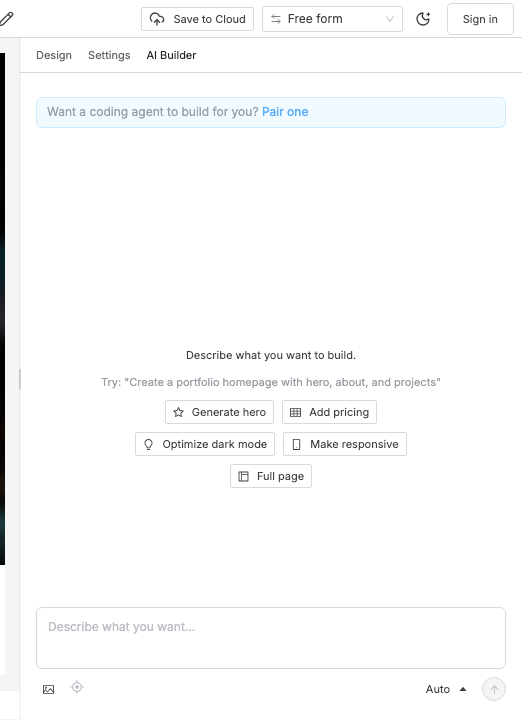
Quick actions
Section titled “Quick actions”The buttons above the message box are complete prompts, not templates to fill in. They are the fastest way to see what the builder does:
| Action | What it asks for |
|---|---|
| Generate hero | A hero with a headline, supporting tagline, and a primary CTA |
| Add pricing | A three-tier pricing section with the middle plan highlighted |
| Optimize dark mode | Turns dark mode on and picks dark tokens that match your brand |
| Make responsive | Reworks the selected section’s breakpoints, single column on mobile |
| Full page | A complete homepage — hero, about, features, social proof, final CTA |
Anything a quick action can do, a sentence in the message box can do too.
Auto-edit and suggestion mode
Section titled “Auto-edit and suggestion mode”The builder starts in auto-edit: changes land on the canvas as they are
generated, and you undo anything you dislike with Cmd/Ctrl+Z like any other
edit. A full-page build applies progressively, so you watch the page assemble
section by section.
Switch to suggestion mode and nothing is applied straight away. Changes queue as pending operations you accept or reject individually. Use it when you are editing a page you cannot afford to have rearranged underneath you.
Commit a design direction first
Section titled “Commit a design direction first”For a new site, the single highest-leverage thing you can ask for is a design direction before any sections exist. A direction fixes the typefaces, the type roles, and the palette in one step, and every later edit stays consistent with it. Without one, each new section drifts toward the same generic shape.
Swebsy ships 30 named directions — among them ink-gazette, swiss-clinic,
brutalist-grid, midnight-luxe, riso-print, letterpress, botanical,
and terminal. Ask for one by name, or describe the feeling you want and let
the builder pick:
Commit to the ink-gazette direction, then build a homepage for a print shop.
Build from a screenshot
Section titled “Build from a screenshot”Attach an image with the picture button beside the message box and the builder uses it as a reference for what to construct — a design you like, a sketch, a screenshot of an existing page. Tall screenshots are tiled automatically so nothing is cropped away.
Skills
Section titled “Skills”The builder loads deeper instructions on demand rather than carrying all of
them at once, which keeps ordinary requests cheap. Seven are available:
design-direction, page-composition, copywriting-ux, animation,
forms-interactivity, symbols, and nav-management. You do not invoke them
by hand — asking for the thing loads the relevant skill. Naming what you want
(“make the nav consistent across every page”) is enough.
Keeping costs in check
Section titled “Keeping costs in check”You are billed by your own provider, so the panel tracks what a session costs as it runs and shows a running total at the bottom.
- Session cost warning — set a threshold in Global settings → AI chat and the panel warns you when a session crosses it.
- Redact personal data — strips things that look like personal data from what is sent to the provider.
- Chat history — kept across reloads so a session survives a refresh. Clear it from the panel when you want a clean slate.
The panel shows a chooser instead of a message box — no model is configured. Click Set up API key, or pair a coding agent. See AI builder setup.
Edits are rejected or nothing happens — the canvas is locked while a generation runs. Wait for it to finish, then retry.
The result ignores my theme — say so explicitly (“use the existing theme colors”). Committing a design direction first makes this much less likely.
A full-page build stopped halfway — the run failed partway through. In auto-edit the sections already applied stay; retry the request, or undo back to where you started.