

Project backups
A project backup is a file that captures everything in your project — pages, blocks, styles, and settings — so you can restore it later or open it on a different computer.
For the full project lifecycle — create, rename, copy, delete, back up, restore, and choose between ZIP export and project backup — see Project management.
Export a backup
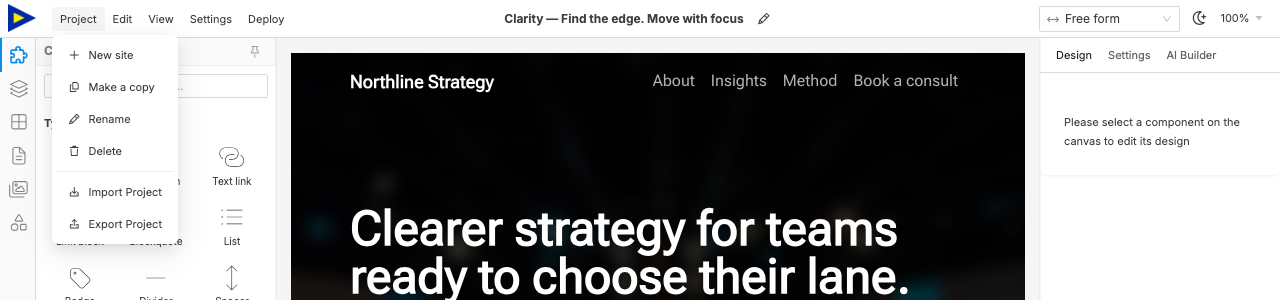
Section titled “Export a backup”- Click the Project menu in the topbar.
- Select Export Project.
- A backup file downloads to your computer.
Restore a backup
Section titled “Restore a backup”- Click the Project menu in the topbar.
- Select Import Project.
- Choose the JSON file you previously exported.
- Confirm the import — this replaces the current project.
What’s included (and excluded)
Section titled “What’s included (and excluded)”| Included | Excluded |
|---|---|
| All pages and blocks | AI chat history |
| Settings (SEO, fonts, analytics, theme, …) | Your Anthropic API key |
| Uploaded assets (images, fonts) | Unsplash API key |
| Deployment config (adapter, repo name) | Cloudflare / GitHub tokens |
Secrets are always stripped from backups for safety.
Backup file is very large — images are included in the backup, so many high-resolution uploads will make it big. Compress images before uploading to keep backup files manageable.
Import fails with “invalid file” error — make sure you’re selecting a backup file exported by Swebsy, not a ZIP or other format.