

Swebsy vs Webflow: pricing, CMS and code export compared
Pick Webflow when content is the job: a blog, a resource library, hundreds of CMS items, several editors with roles and publishing permissions. Nothing in Swebsy replaces that.
Pick Swebsy for a marketing, product or portfolio site that one person or a small team keeps up to date, especially if you want the code. Swebsy’s export is free. Webflow’s needs a paid Workspace plan, and leaves the CMS behind.
We make Swebsy, so weigh that. Every Webflow fact below links to Webflow’s own pricing page or help center. Prices are in USD, checked on 25 September 2026.
At a glance
Section titled “At a glance”| Webflow | Swebsy | |
|---|---|---|
| Best for | Content-heavy sites, marketing teams | Static marketing, product and portfolio sites |
| How you pay | A Site plan per site, plus a Workspace plan for your team | One account plan. Building and exporting are free |
| Free plan | 2 static pages on webflow.io, 50 form submissions | Whole editor, unlimited local projects, no account |
| Custom domain | From $15/month per site (Basic) | Free on GitHub or Cloudflare Pages. From $69/year on our host |
| CMS | Yes, from $25/month per site (Premium) | No |
| Code export | Paid Workspace, from $19/month (Core) | Free, on every plan |
| What the export leaves out | CMS content, forms, site search, password protection, localization | Hosted form collection |
| AI agents | Official MCP server | MCP bridge for coding agents, plus an AI builder with your own key |
| Team editing | Seats and roles, $39/month per extra full seat | Not yet. One editor per project |
Pricing, side by side
Section titled “Pricing, side by side”Webflow charges in two layers. A Site plan pays for hosting one site. A Workspace plan pays for your team’s tools, and it’s where code export lives.
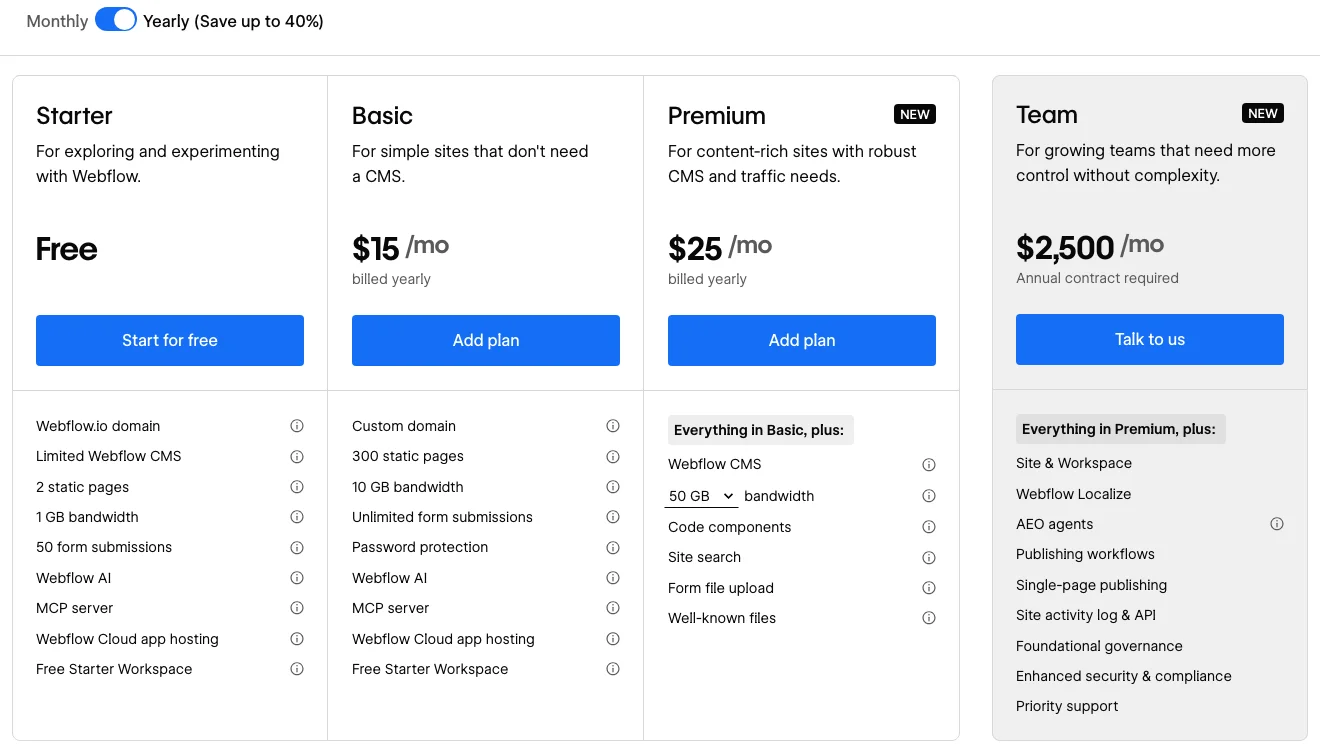
From the Workspace tab on the same pricing page: Starter is free, Core is $19/month and adds code export and custom code, Growth is $49/month. Extra full seats are $39/month each. All billed yearly.
Swebsy has one plan per account. The free plan is the whole editor, with export. The paid plans add hosting on our servers, cloud sync, hosted forms and badge removal:
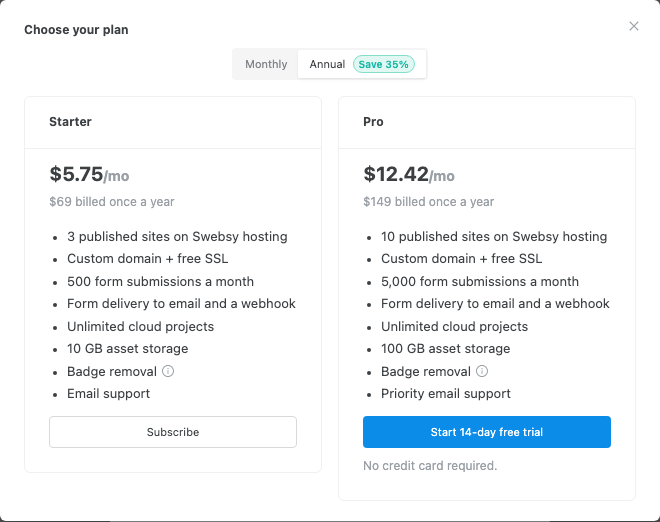
What a year costs for a few common jobs, billed yearly:
| The job | Webflow | Swebsy |
|---|---|---|
| One static site on your own domain, hosted | $180 (Basic) | $69 (Starter), or $0 self-hosted |
| A site with a CMS-driven blog | $300 (Premium) | Not a fit. There’s no CMS |
| Export the code to host it yourself | $228 (Core Workspace) | $0 |
| Hosted site plus code export | $408 (Basic + Core) | $69 |
| 3 hosted client sites | $540 (3 × Basic) | $69 (Starter) |
The Swebsy column is cheaper for static sites. It doesn’t have an answer for the blog row. If you need a CMS, the price comparison stops mattering.
The editors
Section titled “The editors”Webflow’s Designer is a professional tool built on the CSS box model: classes, flexbox, grid, interactions, and a CMS wired into the same canvas. It’s powerful and takes time to learn.

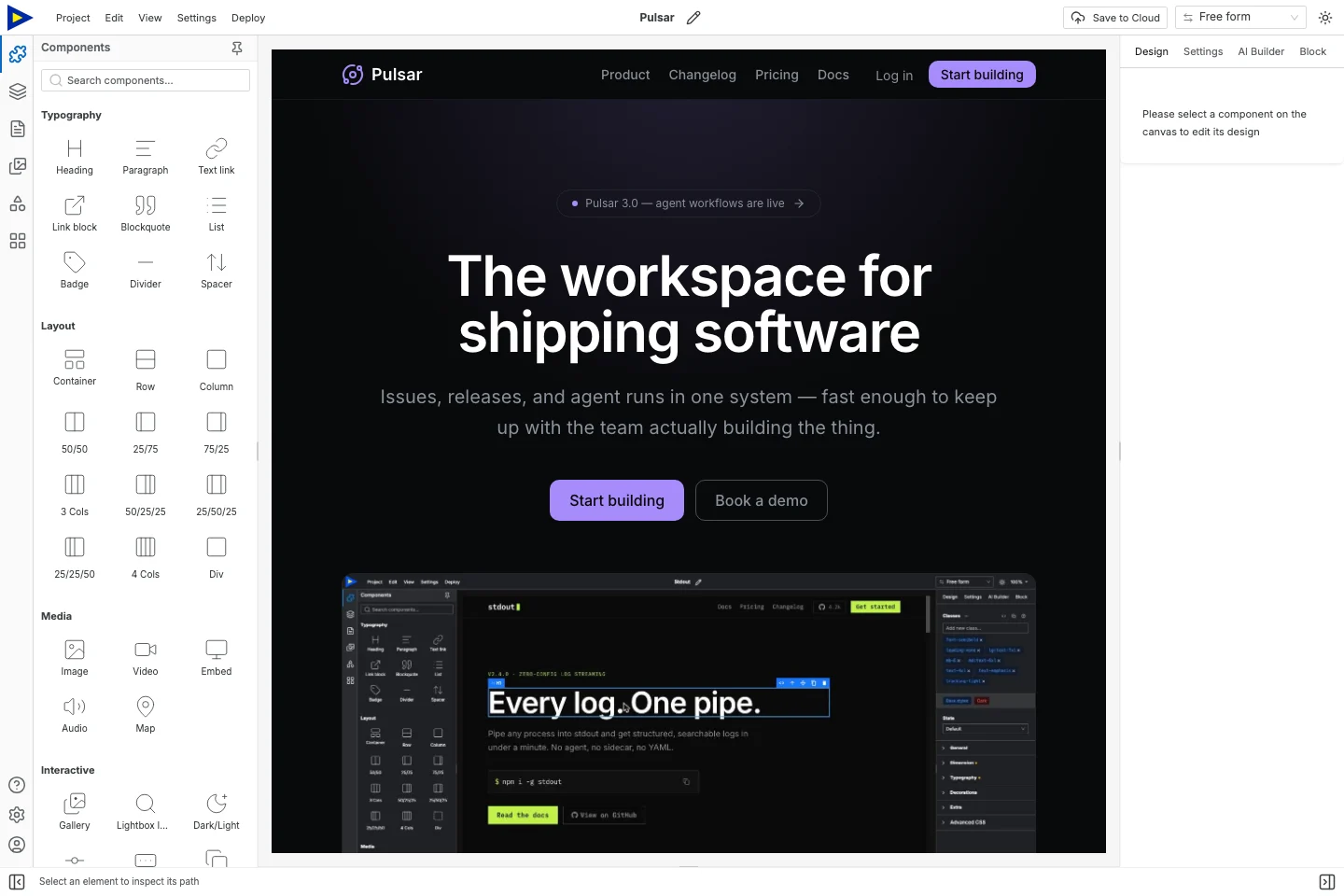
Swebsy’s Studio covers the same visual ground for static sites: layers, a design panel, theme tokens, responsive views and symbols, without the CMS.
What Webflow’s code export includes
Section titled “What Webflow’s code export includes”Webflow’s export guide is clear: on paid Workspace plans you get the HTML, CSS, JavaScript and assets. It also lists what doesn’t come with it:
- CMS content. Collection lists show their empty state.
- Form processing, file uploads and reCAPTCHA.
- Site search and password protection.
- User accounts, ecommerce and localized content.
- Code components.
So the export works best for sites that were static to begin with. If you build on the CMS, you’re building on Webflow’s hosting.
Swebsy exports are static by design, so nothing goes missing on the way out. The one catch is the same: forms. Collect with Swebsy needs Swebsy Hosting. On another host, use Post to my own URL with a form service you trust.
Both work with AI agents
Section titled “Both work with AI agents”Webflow has an official MCP server for agent work on designs and CMS data. Swebsy has an MCP bridge that lets an agent like Claude Code edit a project open in Studio. Neither one is unique.
What to test: can the agent change one section and leave the rest alone? Can you see what it did, and undo it? The Claude Code guide walks through that workflow in Swebsy.
Where Webflow is the better choice
Section titled “Where Webflow is the better choice”- You publish structured content: a blog, case studies, a directory.
- Several people edit, with roles, publishing permissions and staging.
- You need localization, site search, or ecommerce.
- Your client already runs other sites on Webflow.
Where Swebsy is the better choice
Section titled “Where Swebsy is the better choice”- The site is static and you want to own the code, for free.
- You’re paying for hosting on one or more small sites and want the bill lower.
- You host on GitHub Pages or Cloudflare Pages already.
- You’d rather hand a client a ZIP and an editable backup than a Webflow seat.
Moving from Webflow to Swebsy
Section titled “Moving from Webflow to Swebsy”There’s no importer. If your site doesn’t use the CMS, you can rebuild it in Swebsy from a template or from scratch, then reconnect forms and the domain. Keep the same page URLs where you can.
If the CMS carries your site, stay on Webflow. Don’t rebuild a content system as static pages. Otherwise, try the multi-page export guide with your real content before you move anything.