

App preferences
App preferences are about how the Swebsy editor feels while you work. They’re just for you. They don’t change the page on the canvas and they don’t get exported with your site.
You’ll find them in the Global settings dialog. Click the gear icon, either at the bottom of the Studio’s left sidebar or at the top right of the My sites page. It has three tabs, plus your account tabs when you’re signed in:
| Tab | Covers |
|---|---|
| App | Editor theme and anonymous product analytics — this page |
| Build with AI | Connecting ChatGPT, Claude or a coding agent — see Build with ChatGPT, Claude or a coding agent |
| AI chat | Model provider and key — see AI builder setup |
Because they’re global, they apply to every site you open on this machine, not just one project.
Change the editor theme
Section titled “Change the editor theme”- Click the gear icon to open Global settings.
- Stay on the App tab.
- Choose Light, Dark, or System under App Theme.
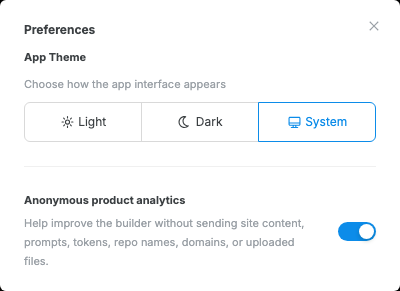
Use System if you want the editor to follow your operating-system appearance setting. Use Light or Dark when you want the editor to stay fixed regardless of the system setting.
Analytics cookie
Section titled “Analytics cookie”Swebsy asks once, with a short cookie notice, whether it may set one analytics cookie. Your answer applies to swebsy.com, the template gallery, these docs, and Studio. The Analytics cookie switch changes that answer. This is separate from any analytics tags you add to your exported website.
- Click the gear icon to open Global settings.
- Stay on the App tab.
- Turn Analytics cookie on or off.
Analytics events never include site content, prompts, tokens, repo names, or uploaded files. See the privacy policy for everything that is collected.