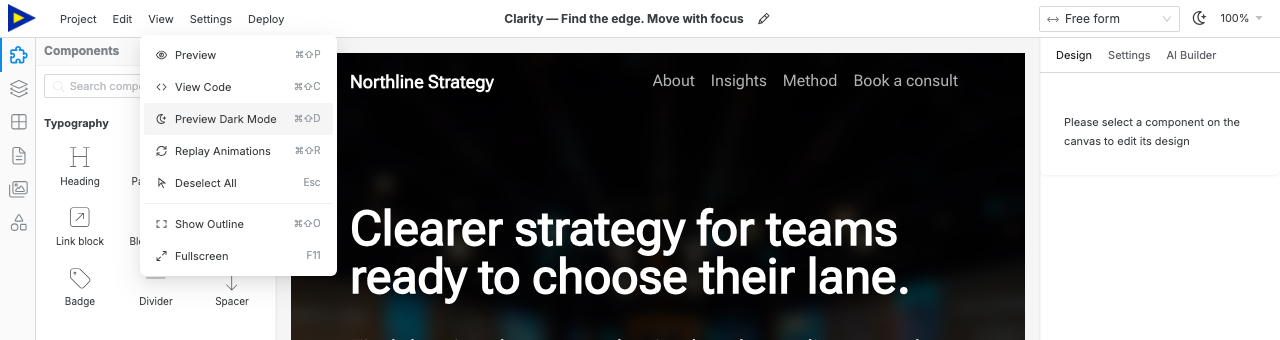
Every shortcut below uses Cmd on Mac and Ctrl on Windows/Linux unless noted otherwise.
The topbar menus list their own shortcuts, so you rarely need this page twice.
| Action |
Mac |
Windows / Linux |
| Preview |
⌘⇧P |
Ctrl+Shift+P |
| View Code |
⌘⇧C |
Ctrl+Shift+C |
| Toggle dark mode |
⌘⇧D |
Ctrl+Shift+D |
| Replay animations |
⌘⇧R |
Ctrl+Shift+R |
| Toggle outline |
⌘⇧O |
Ctrl+Shift+O |
| Fullscreen |
F11 |
F11 |
| Action |
Mac |
Windows / Linux |
| Undo |
⌘Z |
Ctrl+Z |
| Redo |
⌘⇧Z |
Ctrl+Shift+Z |
| Duplicate |
⌘D |
Ctrl+D |
| Delete |
⌫ |
Delete |
| Group |
⌘G |
Ctrl+G |
| Ungroup |
⌘⇧G |
Ctrl+Shift+G |
Right-click an element on the canvas for the same Duplicate and Delete actions,
plus Edit code.
| Action |
Mac |
Windows / Linux |
| Save site settings |
⌘S |
Ctrl+S |
| Tab |
Mac |
Windows / Linux |
| Components |
⌥1 |
Alt+1 |
| Layers |
⌥2 |
Alt+2 |
| Pages |
⌥3 |
Alt+3 |
| Assets |
⌥4 |
Alt+4 |
| Symbols |
⌥5 |
Alt+5 |
| Blocks |
⌥6 |
Alt+6 |
| Device |
Mac |
Windows / Linux |
| Mobile |
⌘⇧1 |
Ctrl+Shift+1 |
| Small tablet |
⌘⇧2 |
Ctrl+Shift+2 |
| Tablet |
⌘⇧3 |
Ctrl+Shift+3 |
| Laptop |
⌘⇧4 |
Ctrl+Shift+4 |
| Desktop |
⌘⇧5 |
Ctrl+Shift+5 |
| Wide screen |
⌘⇧6 |
Ctrl+Shift+6 |
| All sizes |
⌘⇧0 |
Ctrl+Shift+0 |
| Action |
Shortcut |
| Select component |
Click |
| Edit text inline |
Double-click |
| Deselect all |
Esc |